
Invoices in.
Approved bills out.
Suppliers keep sending invoices the way they already do. WhatsApp, email, a photo of a paper receipt, in whatever language or layout they use. Clearline reads them without a template, flags anything it isn't sure about, and posts an approved bill into the accounting system you already run.
Any invoice channel. Any language. Straight into your books.
See what manual processing is costing youThe screen your team opens every morning
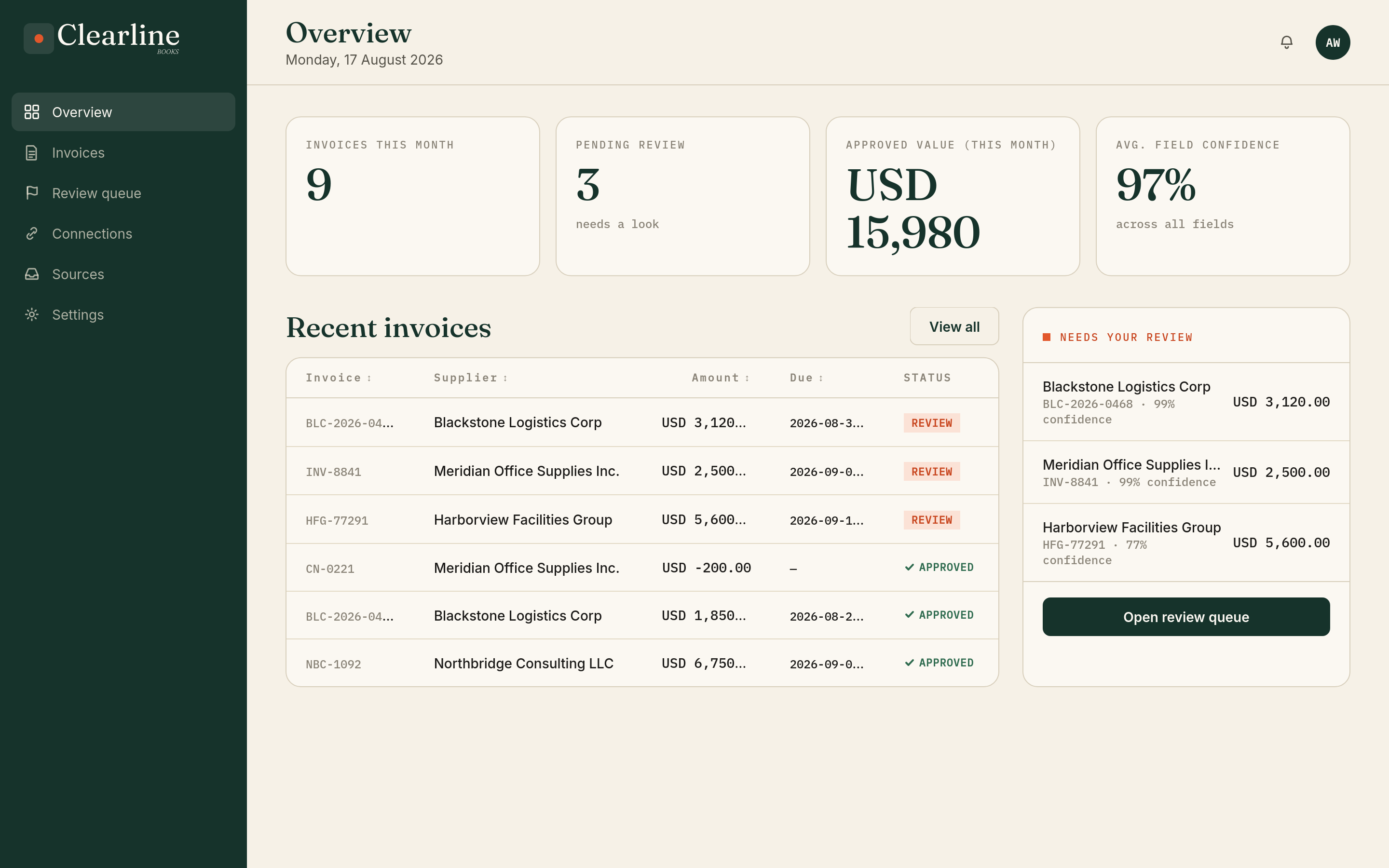
This is what it looks like on a Tuesday.
From any invoice source to a posted bill
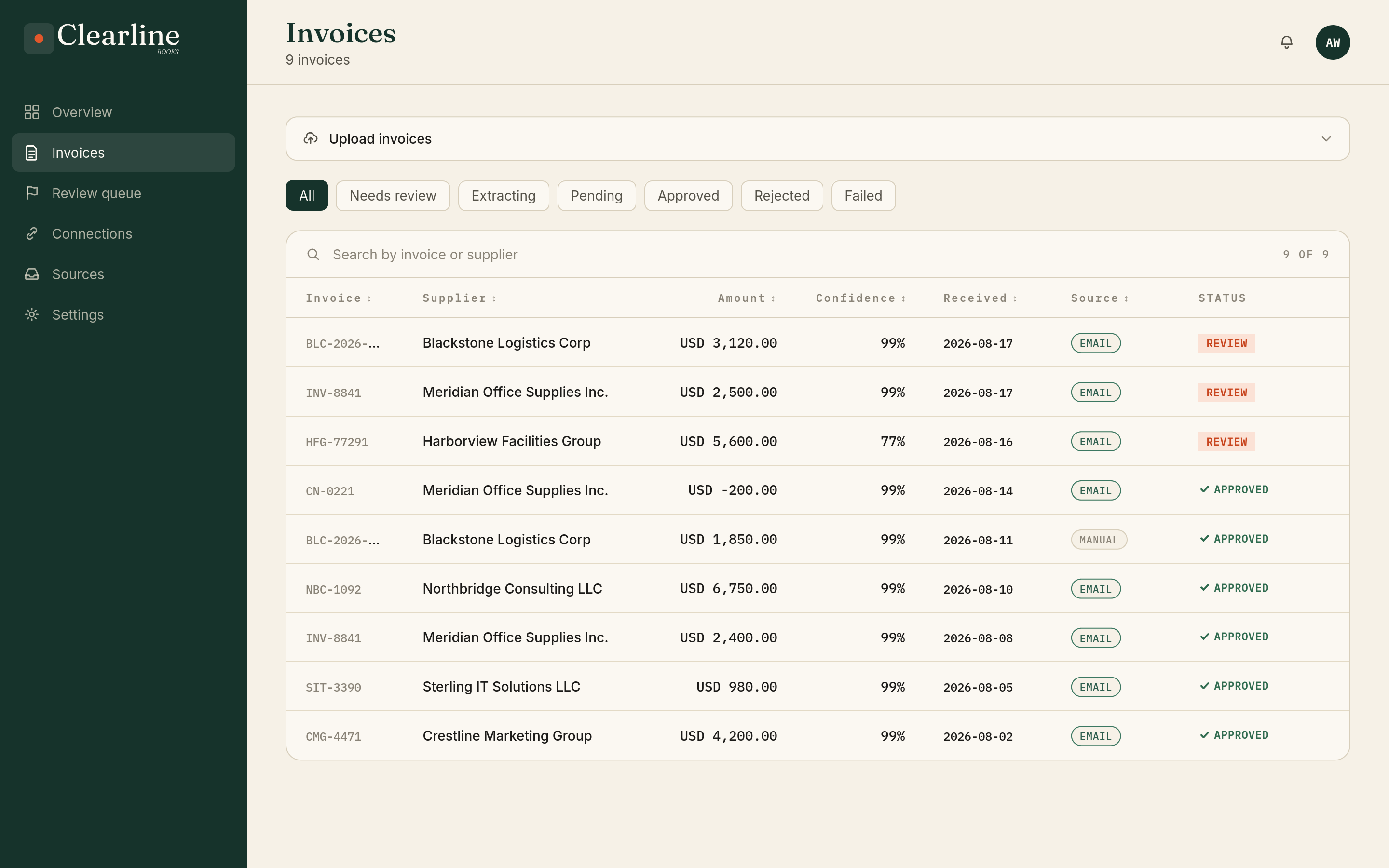
Send it through WhatsApp, forward it by email, or upload it directly. Clearline handles the rest.
Send it however invoices already arrive
A WhatsApp photo, a forwarded email, a stack of PDFs dropped in at once. Any language, any layout, one invoice or a hundred in the same batch. Clearline doesn't need to know the format in advance.
Clearline reads each one on its own
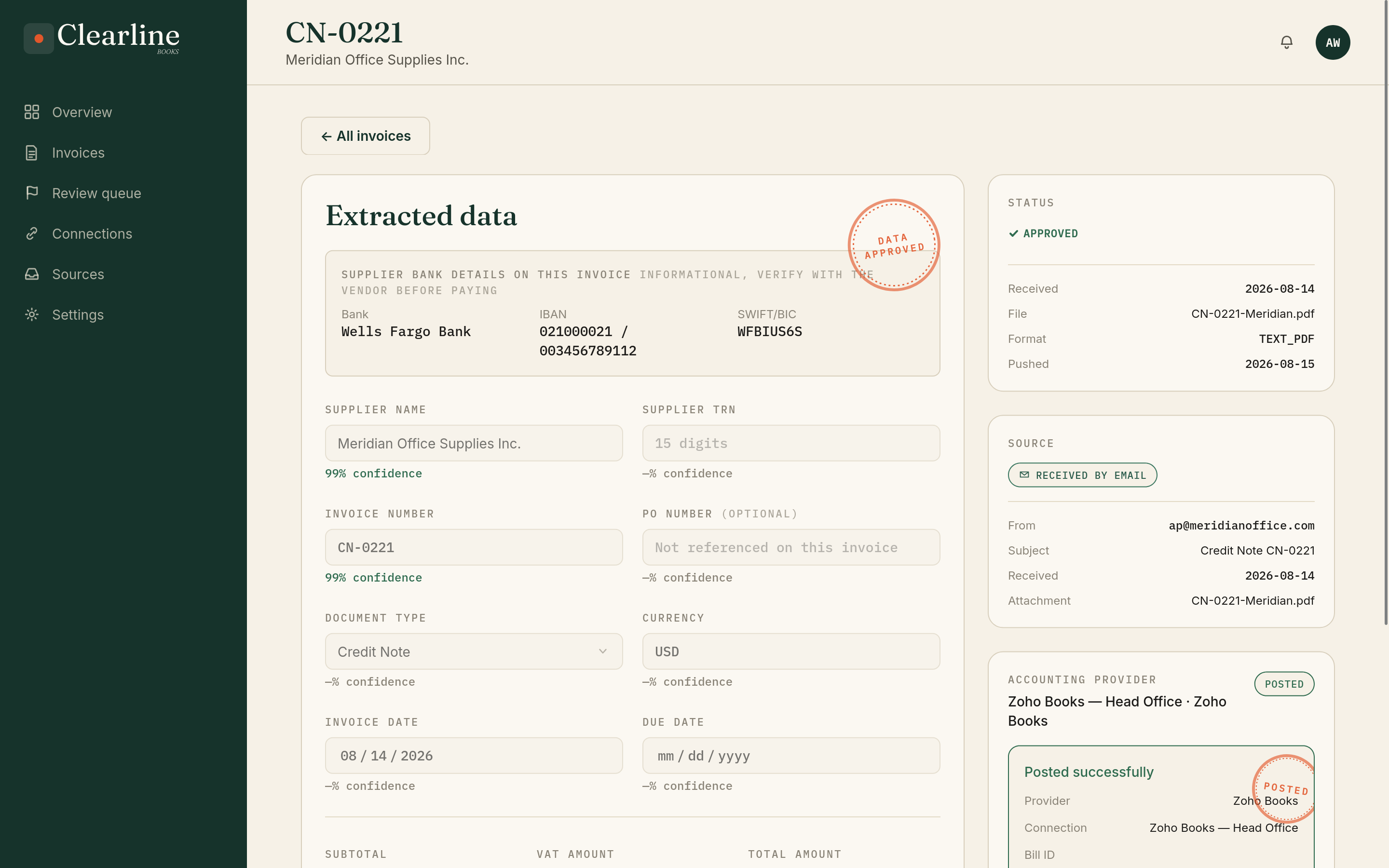
Clearline pulls out the supplier, tax ID, line items, totals, due date, and the purchase order number when there is one, then works out what kind of document it actually is: tax invoice, proforma, credit note, or debit note. Every document gets its own draft, so a batch of fifty invoices comes out as fifty entries, not one pile to sort through.
You're checking a form, not filling one in
Each draft shows up pre filled and structured. Your job is reviewing and adjusting the handful of fields Clearline flagged, not typing the invoice in from a blank screen.
Confirm it, and it's in your books
Approve a draft and it posts coded and ready to pay, PO already matched and bank details checked, in Zoho Books, QuickBooks, SAP, Odoo, whichever system you already run.
What invoice processing costs without automation
Independent industry research on the gap between typical AP teams and the best-performing ones.
79% lower, best-in-class vs. everyone else
79% faster, best-in-class vs. everyone else
1.8x higher, best-in-class vs. everyone else
47% lower, best-in-class vs. everyone else
Source: Ardent Partners, "The State of ePayables 2025: AP's Unfinished Journey." Read our full breakdown. Industry-wide research, not measured results from Clearline.
The full path from invoice capture to books
Whether an invoice arrives through WhatsApp, forwarded email, or direct upload, in any language or layout, Clearline handles the full accounts payable intake: extraction, validation, review, approval, and posting into the accounting system your team already uses.
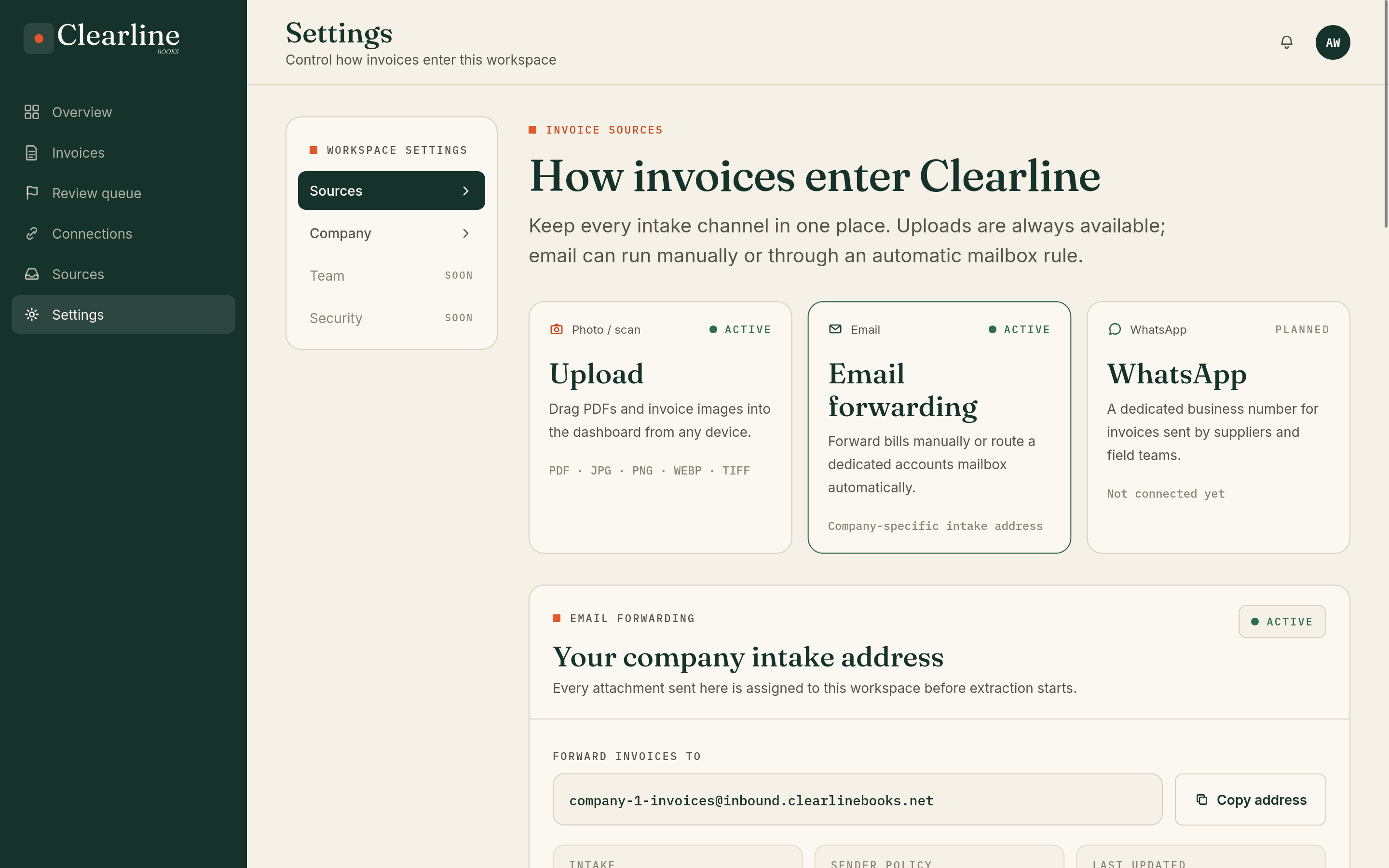
Email capture without inbox access. Forward invoices manually or set an automatic rule from approved company addresses. Clearline receives only what your team sends; email remains one channel alongside WhatsApp and uploads.
Optional automationMulti-channel capture
WhatsApp, email forwarding, and drag and drop upload. Teams can forward invoices manually or automate the flow from approved company addresses, without giving Clearline access to the rest of their inbox.
No templates, no per-language setup
Clearline doesn't need to learn a supplier's layout before it can read their invoices. It works across formats and languages from the first document, so a vendor Clearline has never seen, writing in a language it's never processed for you, reads the same as one it's handled a thousand times.
PO matching, not just PO capture
Clearline reads the PO number off an invoice and matches it straight to the purchase order already open in Odoo or Zoho Books, so what was ordered and what was billed are linked without anyone chasing it down.
Knows a quote from a bill
Every document gets classified: tax invoice, proforma, credit note, or debit note. Anything that isn't a final, postable invoice is held for a quick confirmation, so a quote never slips through as a real bill.
Bank detail fraud alerts
Every invoice's bank details get checked against what that same supplier used last time. A changed IBAN or account number doesn't get blocked, it gets flagged, so nothing pays out on details that quietly shifted.
Catches the same invoice twice
Every new invoice gets checked against what that supplier has already billed. Same invoice number with a different amount gets flagged before it's paid twice, not caught after the fact.
Review queue, not a black box
Per field confidence scoring routes only the uncertain fields to a human. Everything else flows straight through.
Approvals and audit trail
Who approved what, when, and what changed. Every bill carries its full history when the auditor asks.
Rejections go back to the source
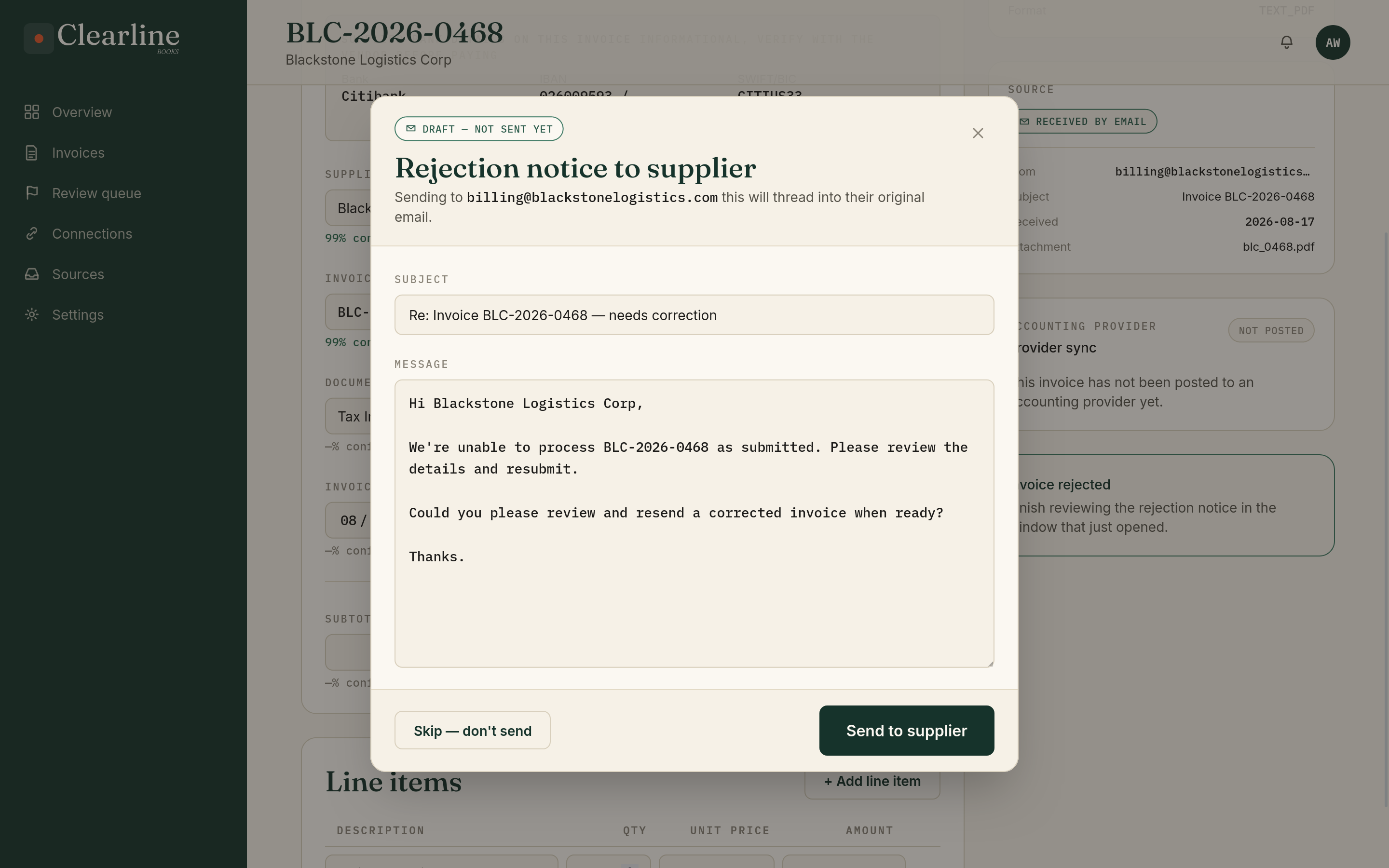
When a draft gets rejected, Clearline drafts a reply straight into the original email thread, ready to edit and send. The supplier gets a clear answer instead of chasing your team for one.
Compliance rules that follow the market
Tax ID and VAT checks follow the rules of wherever an invoice belongs, not one template stretched across every country. Live e-invoicing mandates are already built in, and the compliance layer is designed to pick up each new country's rules as it comes online, without a rebuild.
Works with your accounting software
Xero, Zoho Books, Odoo, Sage, QuickBooks, SAP Business One, NetSuite, and MYOB. Approved bills post as drafts where your accountant already works. Running more than one? Clearline routes each bill to the right one.
Every invoice traces back to its source
Each bill keeps a visible link to exactly where it came from, the email, the attachment, the upload. When someone asks "where did this come from," the answer is a click away, not a search.
Bills land where your accountant already works
Clearline doesn't replace your accounting system, it feeds it. Once a bill is approved, it shows up as a draft in Xero, Zoho Books, Odoo, Sage, QuickBooks, SAP Business One, NetSuite, or MYOB, sitting right next to whatever your team enters by hand, ready for someone to check and pay.
Running more than one system, a subsidiary on Odoo while head office runs Xero, or a firm where each client uses something different? Clearline knows which invoice belongs to which entity and sends it to the right place. One inbox for every invoice, no retyping between systems.
Running something else? Tell us on the demo call. We're adding new systems based on what our early clients need.
- Supplier
- Meridian Labs Ltd
- Tax ID
- GB 123 4567 89
- Document type
- Tax Invoice
- Invoice date
- 02 Jul 2026
- Due date
- 17 Jul 2026
- Amount (incl. VAT)
- $0.00
Different from what this supplier used last time. Held for review, nothing pays out until it's confirmed.
One field fell below the confidence threshold and one bank detail changed. Clearline holds both for your review instead of guessing. Nothing posts to your books until they're confirmed.
Built for real invoices, and honest about where they get hard
A scanned invoice with tight handwriting is genuinely harder to read than a clean digital PDF, whatever script or language it's written in. Rather than paper over that, Clearline runs every field through multiple extraction passes, scores its own confidence, and routes anything uncertain to a short human review, so nothing reaches your books without someone signing off on it.
That same discipline covers more than confidence scores. Clearline checks a supplier's bank details on every invoice against what that supplier used last time, and flags it the moment an account changes, one of the most common invoice fraud patterns there is. It never blocks a normal invoice; it just raises a hand when something looks different.
E-invoicing rules are moving fast worldwide, and they don't look the same from one country to the next. Clearline checks tax IDs and VAT against the rules of whichever market an invoice belongs to, by default, not bolted on after the fact. Current e-invoicing mandates are already built in, and the same framework is designed to pick up each new country's rules as they come into force.
Language and layout work the same way. Clearline was built to generalize from the start, not to be retrained for every new market it enters.
What could invoice processing cost you?
Industry research puts manual processing at $9.84 per invoice on average, against $2.65 for best-in-class teams. Plug in your own monthly volume to see the gap.
$9.84
per invoice
$2.65
per invoice
Show us how your invoices come in. We'll show you what Clearline does with them.
We're working directly with a small number of SMEs while we build out Clearline. No self serve sign up yet, tell us about your invoice flow and we'll set up a working session, then your workspace.